


Skip to content

Image: IDG
Linux is not the same as Windows, so let’s dive into what you need to know.
Windows programs cannot be started directly in Linux. With the help of virtualization or , however, you can also use Windows programs under Linux.
This means that you have to change not only the operating system, but also at least some of the software. This is easy if you are already using mainly open source software under Windows. Important programs such as , Firefox, Thunderbird, and are available for Linux and Windows, and the operation is largely identical.
There are alternatives for other applications. However, some of the functions and operation differ considerably from the programs you have probably used under Windows up to now. You should therefore expect a certain amount of familiarization time.
See also: How to use Windows software in Linux
Installing software under Linux
Under Windows 10 or 11, you use the Microsoft Store to install new software and also for updates. What is not offered here is setup using a setup tool that you download from the manufacturer’s website or other sources. There is no standardized software management and therefore no update function for all programs.
Linux systems obtain software from the repositories of the respective distribution. There is a central package database, updates cover the system and every installed program. This ensures a high level of security because the program packages are checked and signed.
However, Linux distributions with long-term support (LTS), such as or , have a disadvantage: Hardly any new software is available during the support period of five years. Security-critical software such as Firefox and Thunderbird are updated regularly, but a program such as Libre Office remains on the main version. This ensures the stability of the system.
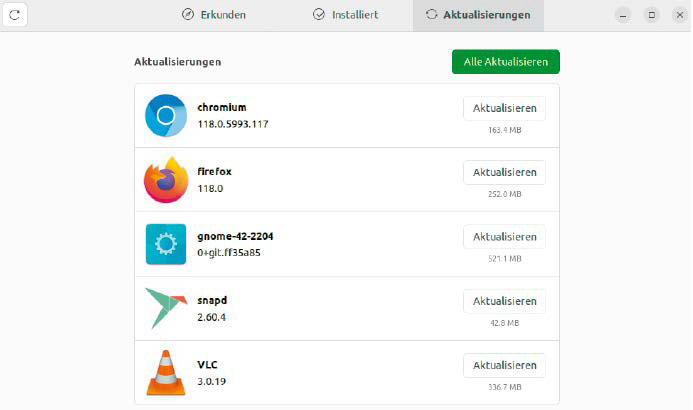
Keep software up to date: Linux automatically informs you about available updates. Installation is centralized for the system and all installed applications.
IDG
Newer programs for Linux: To ensure that users of LTS distributions still receive newer software, Ubuntu and Linux Mint rely on container formats in addition to standard package management — albeit in two different formats (Snap and Flatpak). The container installation sets up the program and all necessary system files in a separate area so that the rest of the system is not affected by newer files. The process requires more space on the hard drive than conventional package installations.
For the user, the exact format of the packages does not initially matter. This is because package management is still centralised — in Ubuntu via the “Ubuntu Software” tool and in Linux Mint via “Application Management.” You can search for programs or be inspired by the recommendations.
When installing new programs,